Open Forum

  • 1.  IMAGES & PLANS for SUPER simple set design project??

    Posted 01-26-2016 13:33

    Google has LET ME DOWN!

    I'm challenged with creating a hands-on lesson on scenic design without having all of my students in one class at one time due to testing.

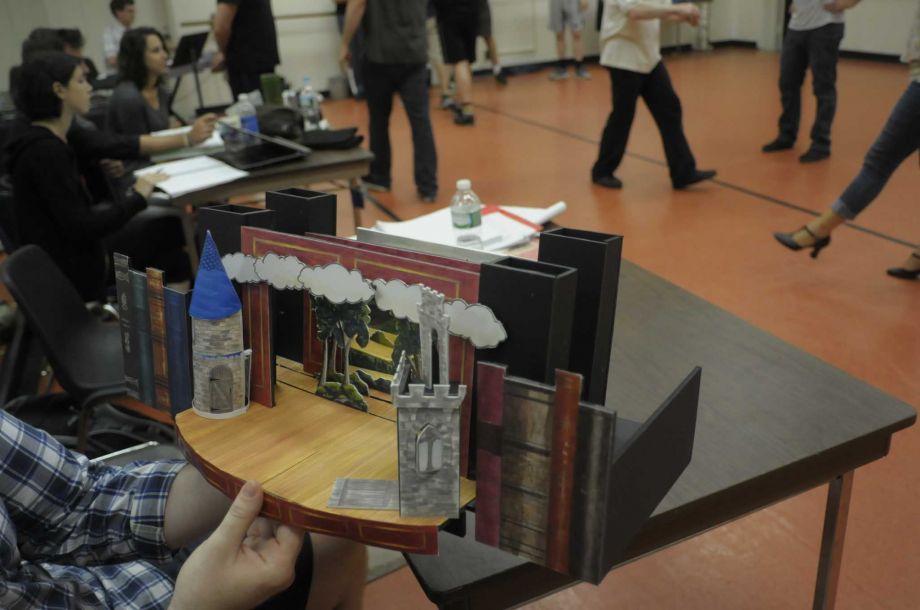
    Firstly, does anyone have one of those "create this scene 3-dimensionally on a proscenium stage with file folders and glue" type lesson plans already? Translation: amazingly about the "script realization" and less about the actual parameters of set *design*. Oh... and K.I.S.S. 

    And does anyone have images of these works their students have created in the past? Our school drives were completely wiped clean in Octobber and I--- lost--- everything that I hadn't Dropboxed yet.

    Finally, am always up to using new materials. I've been using the set-up to "A Doll's House" (the kids have always enjoyed the challenge of the door and I enjoy seeing who remembers the Christmas tree detail)  but I'm open to new ideas. 

    ACT I 
    
    A room, comfortably and tastefully, but not expensively, 
    furnished. In the back, on stage right, a door leads to the 
    hall ; on stage left another door leads to Helmer's study. 
    Between the two doors a piano. In the center of the SL wall a door,
    and nearer the front a window. Near the window a round table with armchairs and a small sofa. In the right wall, somewhat to the back, a door, and against the same wall, farther DS, a porcelain stove; in front of it a couple of armchairs and a rocking-chair. Between the stove and the side-door a small table. Engravings on the walls. A whatnot with china and bric-a-brac. A small bookcase filled with handsomely bound books. Carpet. A fire in the stove. It is a winter day.

    A bell rings in the hall outside. Presently the outer door 
    of the flat is heard to open. Then Nora enters, humming 
    gaily. She is in outdoor dress, and carries several parcels, 
    which she lays on the SR table. She leaves the door 
    into the hall open, and a Porter is seen outside, carrying a 
    Christmas-tree and a basket, which he gives to the maid- 
    servant who has opened the door.

    ------------------------------
    Donalda A. McCarthy
    Theatre Teacher
    Palm Beach Lakes High School
    West Palm Beach FL
    ------------------------------


  • 2.  RE: IMAGES & PLANS for SUPER simple set design project??

    Posted 01-27-2016 07:26
      |   view attached
    I've attached a PDF of a sheet I've used with my Theater 1 kids, most of whom do not want to be in theater. But this keeps them from having to "construct" scale models. All they have to do is cut and fold creatively to create furniture, walls, whatever. Hope this helps. 


    Attachment(s)

    pdf
    Scale Model.pdf   572 KB 1 version


  • 3.  RE: IMAGES & PLANS for SUPER simple set design project??

    Posted 01-28-2016 07:04
      |   view attached

    I have my students use Sketchup (a free download) and do computer design. I change the play year to year.  This year my tech theatre kids are doing Riders to the Sea.

    I have to scan the assignment because I lost it somewhere.  But here it is as a PDF.  Feel free to adapt as you need to!

    ------------------------------
    Raymond Palasz
    English/Theatre Faculty; Thespian Troupe Director
    Lake Central High School
    Schererville IN

    Attachment(s)


  • 4.  RE: IMAGES & PLANS for SUPER simple set design project??

    Posted 01-28-2016 10:14

    Love the idea of using a computer generated program but I wasn't able to do anything except look at the scale model of the stage.  How do we actually use the sketchup program?  

    ------------------------------
    Bernadette MacLeod
    Charlotte NC


  • 5.  RE: IMAGES & PLANS for SUPER simple set design project??

    Posted 01-29-2016 05:57

    Bernadette,

    What we do is read a play, this year is Riders to the Sea.  It's short, and only has one scene.  Then they come up with a set design for the show and put it on the model stage.  I show them how to draw flats (you have to draw a 2D rectangle and then use the Push/Pull tool to give it thickness), and how to cut out openings.  I show them how to move the pieces around and to angle them.  I show them how to put texture and color on the objects.  

    Then I let them go.  I do have them show me a sketched out version of the ground plan so I can see what they are working with.  But most of the time, especially working in pairs, they do quite well in navigating the program.  But you want to be sure you have a handle of the basics (see above) before you start.  I'm sure there are even some YouTube videos offering tutorials on the program.

    Let me know if I can be of further help!

    Ray

    ------------------------------
    Raymond Palasz
    English/Theatre Faculty; Thespian Troupe Director
    Lake Central High School
    Schererville IN


  • 6.  RE: IMAGES & PLANS for SUPER simple set design project??

    Posted 01-29-2016 08:21

    While no one has mentioned VectorWorks, here is a video showing how to take a VectorWorks drawing and making a model. You might be able to adapt it to SketchUp.

    Making White Models using VectorWorks, part I

    Hstech remove preview
    Making White Models using VectorWorks, part I
    A tutorial showing how to create a basic ground plan of a simple set in Vectorworks. We then explore working planes that allow us to print each wall from its "front" view. These will then become the actual white model walls.The tutorial is shown at a faster speed and sounds like it.See part two for the paper version.
    View this on Hstech >
    ------------------------------
    John Perry
    Drama Instructor
    Atherton High School
    Louisville KY


  • 7.  RE: IMAGES & PLANS for SUPER simple set design project??

    Posted 01-29-2016 08:28

    And this site will lead you to more SketchUp tutorials by Sean O'SKea, he's great!

    Sketchup 2 TA143.wmv

    YouTube remove preview
    Sketchup 2 TA143.wmv
    The second tutorial for the Sketchup class assignment for SOU TA143 Set I
    View this on YouTube >
    ------------------------------
    John Perry
    Drama Instructor
    Atherton High School
    Louisville KY


  • 8.  RE: IMAGES & PLANS for SUPER simple set design project??

    Posted 01-30-2016 14:42

    I’ve been using SketchUp for years in my design work, both theatrical and non-theatrical, and I love it. It’s a fantastic tool, and I find it exciting that more schools and colleges ae using it.

    However, the other side of the coin is that it’s very easy to get caught up depending on the primitives (the squares, rectangles, and other shapes), and have the end product look like a bunch of shapes. It’s what we used to call letting the pencil drive the hand. I’ve seen sets out there, in life and online, that have “Done with SketchUp” written all over them, and they tend to look static and mechanical.

    The trick to using SketchUp is to “design the set” first, and then use the program to draw the parts (the walls, ramps, or whatever) that make up the set. When I start a new project, I don’t even go to SketchUp until I know exactly what I want to do, and, even then, I keep referring to the script to see how the design works in terms of the story. Like back in the pre-SketchUp days, I work the design out on very small pencil sketches until I’m happy with it, and only then start laying it out.

    The other thing I have found is that it’s much easier and faster to make revisions to a sketch on paper than it is in SketchUp. A couple of days ago I was working on a design that involves six periaktoi that move around the stage a number of times, so I just cut six little triangles out of paper and moved them around for each scene until I was happy with the look and the flow. Then I drew them in SketchUp. It would have taken all day to do all that moving around on the screen.

    Below are three SketchUp renderings (for actual sets) from my web site, which would have never looked like this if I had started designing them in SketchUp. A #2 pencil on a piece of paper can get you to some wonderful places.


    ------------------------------
    George F. Ledo
    Set designer
    www.setdesignandtech.wordpress.com
    www.georgefledo.net